open source has a door.
git into gsoc finds the organizations that fit you, the repositories where a newcomer's pull request actually gets merged, and the beginner issues nobody has claimed yet. It works in your terminal and inside your AI assistant. Land one real contribution before Google Summer of Code applications open.
curl -fsSL https://raw.githubusercontent.com/anandkaranubc/git-into-gsoc/main/install.sh | bash
# then, in a new terminal:
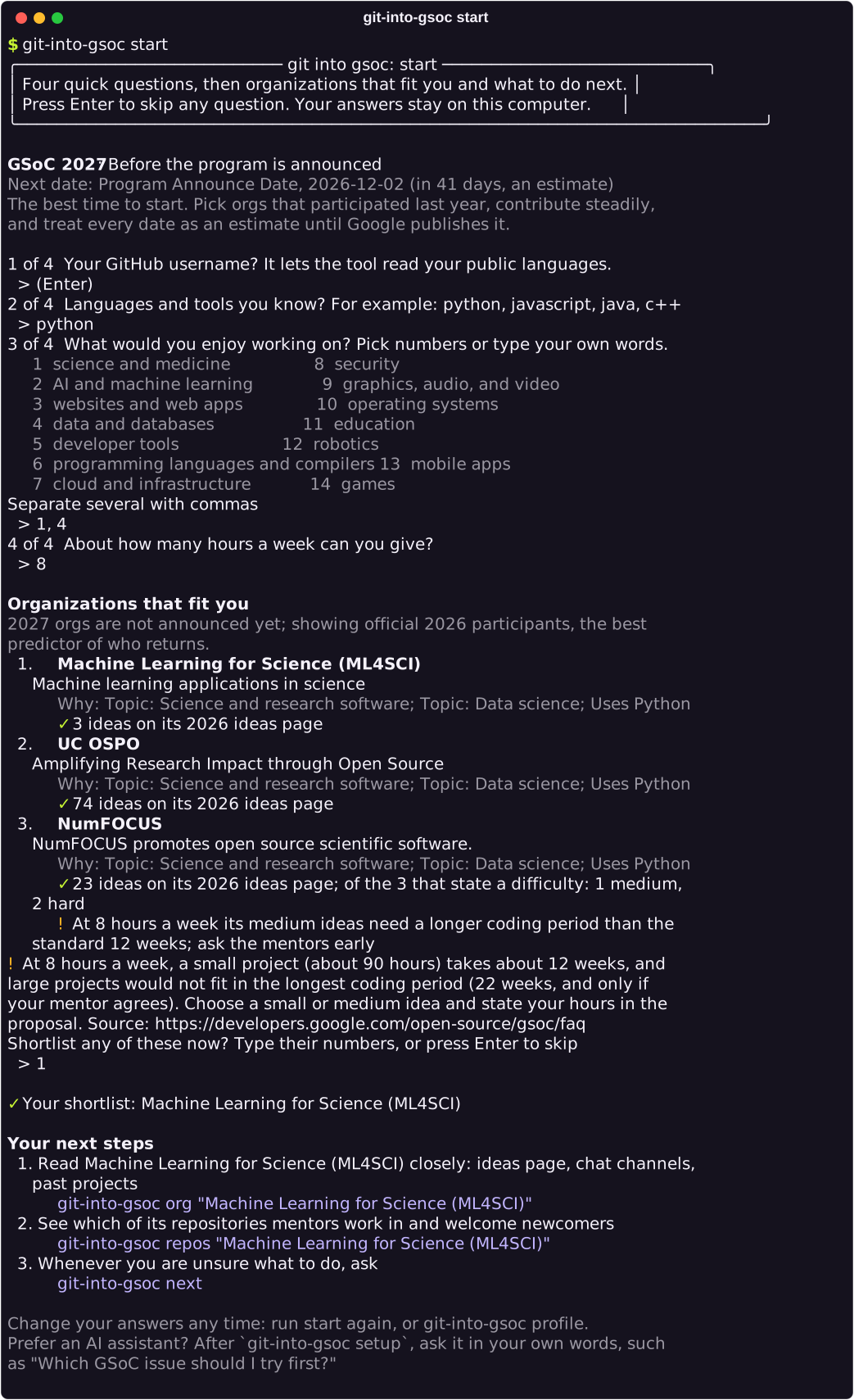
git-into-gsoc start
irm https://raw.githubusercontent.com/anandkaranubc/git-into-gsoc/main/install.ps1 | iex
# then, in a new PowerShell window:
git-into-gsoc startYou only need an internet connection. If Python is missing, the installer offers uv, a free tool that brings its own. It connects the AI assistants it finds and tells you exactly what it changed. No account or token needed to start. Already use uv or pipx? uv tool install git-into-gsoc installs the package from PyPI. Other ways to install.
four questions. two minutes.
git-into-gsoc start asks what you know, what you would enjoy working on, and how much time you have. Press Enter to skip any of them.
- Organizations that fit you, from the official list, each with the reasons it matched.
- A shortlist you build by typing numbers, saved on your computer.
- Your next steps with the exact commands, so you are never stuck on a blank prompt.
Later, run git-into-gsoc on its own to see your progress, or git-into-gsoc next for what to do today: deadlines, changes on issues you follow, and new beginner issues.
the way in is hard to find.
Every season, many first-timers end up in an inactive repository, under an issue five people already claimed, or with a proposal that reads like a hundred others. The information to avoid that is scattered. This tool gathers it.
git into gsoc reads the official program site, the organization archive, and GitHub, then shows you:
- which organizations match your languages and interests, with their slot history and past project titles
- which of their repositories mentors actually work in, and whether outside contributors' pull requests get merged there
- which beginner issues are still free, read from the issue timeline: claims, assignees, linked pull requests, maintainer replies
- what phase the program is in right now, with official dates when they exist and labelled estimates when they don't
Missing data is reported as missing. Nothing is invented to fill a table.
$ git-into-gsoc issue owner/repo#123

╭──────────────── owner/repo#123 ────────────────╮
│ Date parser drops the leap day                 │
│ https://github.com/owner/repo/issues/123       │
│ Status: contested (3 people asked to work on   │
│ this in the last 60 days)                      │
│ Claim: @chi 2d ago                             │
│ Claim: @ben 5d ago                             │
│ Claim: @ana 9d ago                             │
╰────────────────────────────────────────────────╯
Before you comment
  ☐ Read the whole thread and any linked PRs first.
  ☐ Reproduce the problem locally (or confirm the
    docs gap) before claiming.
  ☐ Point to the code you would change and outline
    your approach in 2-3 sentences.
  ☐ Ask whether the approach fits; do not just
    write 'can I work on this?'.
  ☐ If someone claimed it recently, pick another
    issue rather than competing.
ten steps. one contribution.
Ten phases, covered in eight guide pages with real commands and expected output. Skip what you know. Loop when you need to.
-
Learn
What GSoC is, what it isn't, and where you are in the year.
Understand GSoC -
Discover
A short list of organizations, each with a reason it fits you.
Find organizations -
Evaluate
One or two repositories that merge newcomers' work.
Pick a repository -
Orient
You know where a change would go and how to test it.
Get your bearings -
Community
Mentors recognize your name from useful questions, before you claim anything.
Introduce yourself -
Find an issue
One available, well-specified issue you can reproduce.
Choose an issue -
Contribute
A focused pull request you can explain line by line.
First contribution -
Iterate
Every review comment answered, through to a merge or a clear no.
See it through review -
Proposal
An original draft shaped by the organization's template and feedback.
Prepare a proposal -
Track
A weekly log, a shortlist, and always one manageable next step.
Track progress
house rules.
These are built into the tool, the assistant skill, and the docs. They are also stickers.
-

Every organization, repository, issue, and date comes from the official program site, the public archive, or GitHub. Scores are explained. When data is missing, the tool says so instead of guessing.
-

No typo farms, no mass "assign me" comments, no generated essays. One useful change you understand well enough to defend in review is worth more than twenty you don't.
-

The tool never posts, comments, or submits anything for you. Your profile and progress stay in a file on your computer. No account, no tracking. Every message a maintainer reads is one you wrote.
-

The goal is a reviewed, merged contribution and a mentor who knows your name from useful work.
bring your assistant.
The same tools run inside any MCP client, and a portable Agent Skill teaches the assistant how to coach without fabricating or spamming. It can look things up for you. It still can't write your proposal, and many organizations' AI policies say it shouldn't.
- Claude Code
- Codex
- Cursor
- VS Code
- Copilot CLI
- Gemini CLI
- Antigravity
- Windsurf
- any MCP client
One command finds the assistants on your machine, copies the skill into each one, and registers the MCP server in its configuration, keeping a backup of anything it touches. The installer already ran it for you; run it again whenever you add an assistant. Prefer a plugin? Claude Code, Codex, Copilot, Gemini CLI, and Antigravity install the skill and server with their own commands, listed on the assistant page with one-click buttons for VS Code and Cursor. The assistant setup guide covers manual configuration, and the MCP reference lists every tool.
git-into-gsoc setup
git-into-gsoc doctor
setup finds your assistants (claude code, codex, cursor,
vs code, copilot, gemini, antigravity, windsurf),
copies the skill, and registers the mcp server.
keeps .bak copies.
doctor shows what is configured and where
then ask, in your own words:
"I want to do Google Summer of Code. I know Python
and like science. Where do I start?"